

Want some great Photoshop tutorials to enhance your Photoshop skills? Here’s a great list of 70+ great tutorials for Adobe Photoshop.
Showing posts with label Design & Development. Show all posts
Showing posts with label Design & Development. Show all posts
Thursday, January 29, 2009
Saturday, May 17, 2008
Download 'The Photoshop Anthology' eBook for free
 Sitepoint is giving away free ebook version of Corrie Haffly’s "The Photoshop Anthology Web Design Tips, Tricks & Techniques", normaly worth $26.37 (paperback). About the book, sitepoint says
 It’s brimming with tried and tested real-world Photoshop solutions that will addYou can check it on Amazon here
impact to your next web design project. If you’ve ever been stuck for
inspiration, have puzzled over just how to create a shiny aqua-style button, or
wanted to create that seamlessly tiling background image you saw on a site
recently, you need to download this book.
Download the ebook for free
Tuesday, April 29, 2008
Javascript in VB.Net webpage
Using javascript in an ASP.net webpage can sometimes do small wonders. It can reduce some coding and also can be efficient at times. Lets look at an example on how to do this.
Consider this ASP.net page.
The page has only one (Just to keep things simple) with the label "Show Javascript Alert". Now before doing some tasks when the user clicks on the button you may sometimes want to display a message to the user or may even ask for a confirmation whether to go ahead. This can be easily done adding a javascript alert and associating it with the button.
Lets say you want to use a javascript alert 'if (! confirm('Continue?')) return false;' to ask the user 'Continue?' and do something if user clicks Yes and Do Nothing if No is clicked. Go to the VB source file of the page and at the Page_Load () event add 'Button1.Attributes.Add("OnClick", "javascript:if (! confirm('Continue?')) return false;")'. This is considering that the Button's id is Button1. Now view the page in your browser and click on the button , you should see the Javascript alert.
What happens here:
If you go back and have a look at the Default.aspx page source, you'll see
This is the line of code which creates the Button and labels it "Show Javascript Alert". But as you can see there's no OnClick event. So the button doesn't do anything till this point.
Now go to the Default.aspx.vb to view the back end VB code of the page. We've added '
' in the Page_Load () event. This is where the buttons 'OnClick' even is defined. One important thing to notice here is that the 'OnClick' doesn't replace the 'Button1_Click' event of the button, in fact 'Button1_Click' gets executed right after the user responds to the OnClick. So we can put whatever action we want to perform if the user says 'Continue' in the Button1_Click() event.
Now load the page in your browser and view the HTML source. Most likely you'd see something like this :
As you can see the 'Button1.Attributes.Add' does the magic here. It lets you add methods to a control. Here we just added the 'OnClick' to the control Button1.
Consider this ASP.net page.
<%@ Page Language="VB" AutoEventWireup="false" CodeFile="Default.aspx.vb" Inherits="_Default" %>
<!DOCTYPE html PUBLIC "-//W3C//DTD XHTML 1.0 Transitional//EN" "http://www.w3.org/TR/xhtml1/DTD/xhtml1-transitional.dtd">
<html xmlns="http://www.w3.org/1999/xhtml">
<head runat="server">
   <title>Javascript-ASP.NET Example</title>
</head>
<body>
   <form id="form1" runat="server">
   <div>
        <asp:Button ID="Button1" runat="server" Text="Show Javascript Alert" />
   <br />
   </div>
   </form>
</body>
</html>
The page has only one (Just to keep things simple) with the label "Show Javascript Alert". Now before doing some tasks when the user clicks on the button you may sometimes want to display a message to the user or may even ask for a confirmation whether to go ahead. This can be easily done adding a javascript alert and associating it with the button.
Lets say you want to use a javascript alert 'if (! confirm('Continue?')) return false;' to ask the user 'Continue?' and do something if user clicks Yes and Do Nothing if No is clicked. Go to the VB source file of the page and at the Page_Load () event add 'Button1.Attributes.Add("OnClick", "javascript:if (! confirm('Continue?')) return false;")'. This is considering that the Button's id is Button1. Now view the page in your browser and click on the button , you should see the Javascript alert.
What happens here:
If you go back and have a look at the Default.aspx page source, you'll see
<asp:Button ID="Button1" runat="server" Text="Show Javascript Alert" />
. This is the line of code which creates the Button and labels it "Show Javascript Alert". But as you can see there's no OnClick event. So the button doesn't do anything till this point.
Now go to the Default.aspx.vb to view the back end VB code of the page. We've added '
Button1.Attributes.Add("OnClick", "javascript:if (! confirm('Continue?')) return false;")
Now load the page in your browser and view the HTML source. Most likely you'd see something like this :
<input type="submit" name="Button1" value="Show Javascript Alert" onclick="javascript:if (! confirm('Continue?')) return false;" id="Button1" />
As you can see the 'Button1.Attributes.Add' does the magic here. It lets you add methods to a control. Here we just added the 'OnClick' to the control Button1.
Saturday, March 29, 2008
Free forum/Community builder software
Look beyond vBulletin. If you are planning to add a forum or bulletin board to your site and don't want to spend a lot on the platform, the good news is that there are a lot of free alternatives available. Here are a few listed below, leave a comment if I have missed out on something.

A free community software based on PHP and MySQL. Complete feature list -
http://www.simplemachines.org/about/features.php
phpBB is one of the most widely used Open Source forum solution. Version 3.0 incorporates a professional-quality modular design, high security, multiple-language interface, support for a multitude of database servers and complete layout customisation, all with a low execution overhead. Complete feature set can be found here http://www.phpbb.com/about/features/
From the creators of WordPress, bbPress is focused on web standards, ease of use, ease of integration, and speed.
View live here http://bbpress.org/forums/
a PHP/MySQL discussion forum with frame-based layout, for easy navigation.
View live forum http://www.beehiveforum.net/forum/
Impressive community builder based on PHP/MySQL With dolphin you can create dating sites, social networks, content sharing portalsThough free, it requires a fee of $39/yr if you want to remove the links to publisher.

Powered by PHP and MySQL, icebb is a free and open source forum solution.
Try it here http://icebb.net/demo/
nextBBS is an open-source Internet forum system written in PHP and its currently running its public beta.
UseBB is a light and Open Source PHP 4 and MySQL based forum package, distributed freely under the GPL license.
Try it here - http://www.usebb.net/community/forum.php?id=7

Vanilla is an open-source, standards-compliant, multi-lingual, fully extensible discussion forum for the web.
Monday, January 14, 2008
11 Free Online Button Generators
Web 2.0 free button maker
Make cool web 2.0 style buttons in 4 easy steps
Coolarchive button maker
Simple button generator to create cool button.
CSS Button generator
A CSS Button & Text Field Generator.
Generate a 80×15 button, also known as “antipixel buttons” or “badges”
GRSites Button Maker
A feature rich button maker with many options. You can even use a font installed in your computer.
Cool Text Button generator
A simple and easy to use button generator.
Freshbadge
Quickly create a web 2.0 badge
Free Gif Button Generator
Free gif button creator (kinda old style).
Free JavaScript Rollover button generator
Enter the image name for the intial image, mouse over image and the url and create your own JavaScript rollover buttons
Free Online Image Mouseover Generator
Create custom rollover or mouseover buttons or images for your web page.
Free online glass button generator
Create a glass button online and download as zipped file.
Saturday, December 29, 2007
Make a text follow a path in Photoshop
Create a new image and select the pen tool by pressing 'p' on the keyboard or clicking on the pen tool icon (red circled in the image below) in the toolbox. Select a type of pen you are comfortable with using. Here I selected the Freeform Pen Tool.
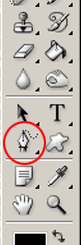
Now draw the path you want with the pen tool.

After you've drawn the path, select the Type tool by pressing 'T' or clicking on the Type Tool
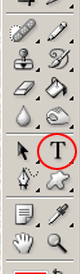
Click on the beginning of the path with the Type tool selected, and start typing your text, you can also change text size, colors etc. So here's the final text.
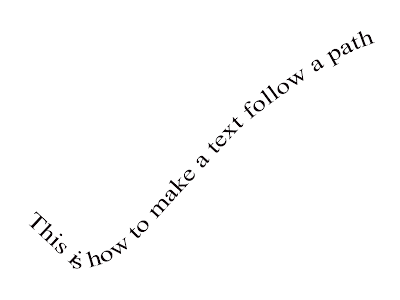
You can also watch a video of this tutorial below ..
Thursday, December 27, 2007
How to create a Xion skin in Photoshop
If you don’t have Xion then you can download it here http://xion.r2.com.au/index.php?page=download.
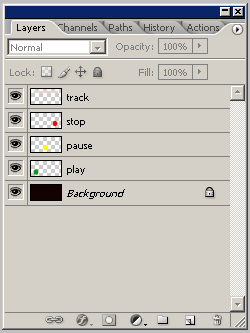
Creating a Xion skin in Photoshop is the easiest way one can create a skin for any application. Xion skins are nothing but a PSD file which can be created with Adobe Photoshop, GIMP or PaintShop Prop etc with specially named layers. The different layers in the PSD file identify the different components of the skins. Like the play button would be drawn in a layer named ‘play’. Anyway it’s easy enough to build your first skin within minutes, So let’s get started with an example.
Create a new image in Photoshop with the size you want. Here I have created an image with 250x120 pixels. Choose any background color or any background image and create the background.

Then create a new layer and then select the elliptical marquee tool and draw a circle and fill it with color. Name this layer as ‘play’.

Now create other layers like ‘pause’, ‘stop’ etc similarly.
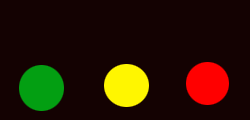
Now add another layer and draw a rectangle like in the image below. Name this layer ‘track’. This is where the track info would be displayed.
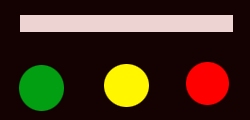
Now save the file with a .psd extension and open it with Xion or just drag the PSD file on Xion. There it is your first Xion skin. The below image shows the layer pallete for reference.
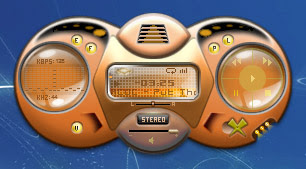
Well, I this is just a demo of how to make skins for your Xion player yourself with photoshop and I have not concentrated on the quality of the skin. But you can create some very impressing skins using this. Like the skin shown below which you can download here.
All the components and functions that a music player typically uses are available with Xion also and they all can be implemented in a Xion skin using photoshop layers. The concept is simple; every layer represents a different component. Just like in this example one layer is play button, another is pause like that. But you have to be careful while naming the layers as it is case sensitive. The complete layer reference can be found here.
Tuesday, November 13, 2007
Google announces $10 million awards for Android Developers

Want $10m? Well, if you are a good coder you may just give it a try. Google announced the 'Android Developer Challenge' with a total awrad money of $10m.
The award money will be distributed equally between two Android Developer Challenges:
* Android Developer Challenge I: Accept submissions from January 2 through March 3, 2008
* Android Developer Challenge II: This part will launch after the first handsets built on the platform become available in the second half of 2008
The 50 most promising entries received by March 3 will each receive a $25,000 award to fund further development.
Google is looking for applications in the following areas -
* Social networking
* Media consumption, management, editing, or sharing, e.g., photos
* Productivity and collaboration such as email, IM, calendar, etc.
* Gaming
* News and information
* Rethinking of traditional user interfaces
* Use of mash-up functionality
* Use of location-based services
* Humanitarian benefits
* Applications in service of global economic development
* Whatever you're excited about!
For more information on the contest and the Android platform and SDK visit
http://code.google.com/android/adc.html
Android Developer Blog
http://android-developers.blogspot.com/


